Continuous curves with ActionScript 3

Seeing my comrade Zach Johnson’s impressive work on generating isoline maps in Flash, I offered to try to lend a hand with smoothing the lines (point-to-point connections) he was deriving from interpolations via Delauney triangulation. I first turned to the fantastic book Foundation Actionscript 3.0 Animation: Making Things Move!, in which Keith Peters presents a method for drawing a continuous curve based on multiple points. (Grant Skinner has a post with a nice demo of the same method and an even cooler demo of a double-line version for fills.) While the method produces a nice, smooth, continuously curved line, it’s not very appropriate for the isoline problem because the curve doesn’t actually pass through any of the specified points, save the first and last. The points in this case are interpolations, so a smoothed line that is essentially an interpolation of an interpolation would be sacrificing too much accuracy.
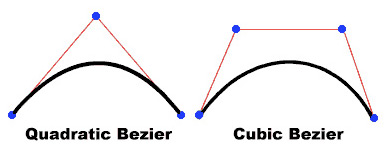
Bezier curves

The bottom line is that I had no luck finding a satisfactory way to use Flash’s built-in curveTo method—which draws quadratic Bézier curves—and instead opted for creating cubic Bézier curves (compare the two in the above image from the Flash documentation). Thanks to Flash’s BezierSegment class, it’s pretty easy to construct these curves. With my limited understanding of the math involved, however, finding good control points for a continuous curve was a bit more challenging.

I put together an AS3 CubicBezier class, which for now just contains two methods: one to draw a continuous series of curves through many points (as was my goal), and one to draw a single curve between two points (seemed worthwhile to throw that in), both demonstrated below. I’m sure there are a few kinks (ha!) to work out, but generally the results seem pretty satisfying. This was written with cartographic generalization in mind, but hopefully it can be more broadly useful.

Files:
These are old versions! See my update post for the latest.
CubicBezier.as
curveTest.zip (AS plus the above demo)

Tagged , , ,

29 Comments

  1. Hi…
    Nice work…considering your ‘limited understanding of the math involved’ … Q: Am I blind? Is that i don’t see where you finally use the z factor (third argument of the curveThroughPoints method)… Thanks

    alvaro obyrne
    20 June 2008 @ 2:37pm

  2. Yikes, thanks for noticing that! Looks like I hard coded a number in when I was messing around with it and forgot to change it back.

    Line 146 of CubicBezier.as, which says:
    var controlDist = Math.min(a,b)*.5
    Should be:
    var controlDist = Math.min(a,b)*z

    I’ve loaded the corrected file to the links given in the post.

    Andy Woodruff
    20 June 2008 @ 2:55pm

  3. thanks

    alvaro obyrne
    20 June 2008 @ 3:07pm

  4. Sorry if you don’t consider this is not the place to post this but have you seen the java demo at http://www.sunsite.ubc.ca/LivingMathematics/V001N01/UBCExamples/Bezier/bezier.html the athor of that applet doesn’t use 100 points in each segment of the curve. He uses a variable number of steps according to the curvature (the straighter the less number of points he uses). If I may say: that should be your next step (I should even farther say : this should be our next step).

    alvaro obyrne
    20 June 2008 @ 3:19pm

  5. Thanks for the link; I hadn’t seen that. Yeah, it’d be good to draw the curves like that. I don’t know that I’ll get around to thinking about that very soon, but if you feel like trying it out I’d definitely love to see what you come up with!

    Andy Woodruff
    20 June 2008 @ 6:55pm

  6. On line 150
    var theta = Math.atan(ry / rx);

    if ry and rx is 0, theata gets NaN, because it cant be 0/0

    if (isNaN(theta)){
    theta = 0;
    }

    Is it right? =)

    //Dennis Öhman =)

    Dennis Öhman
    4 August 2008 @ 4:53am

  7. Sorry, it’s not right solution =D

    Dennis Öhman
    4 August 2008 @ 9:41am

  8. Hi there! Your class is awesome! I did however notice that it messes up if the line between two points is exactly straight. I made a fix by adding a Boolean variable called isStraight that tracks whether it is a straight line or not, and then at the end drawing a straight line instead of curves in that instance.

    Add the below line of code right after the a,b,c distance calculations:
    isStraight = ((a+b)(c-1)) ? true : false;

    and add similar to:
    if (!isStraight) {
    g.curveTo(controlPts[1][0].x,controlPts[1][0].y,p[1].x,p[1].y);
    } else {
    g.lineTo(p[1].x,p[1].y);
    }

    in the three sections at the bottom. Feel free to email me for the code itself if this is not clear. Thanks again for the great work!

    John Currie
    5 September 2008 @ 5:31pm

  9. oops, the first line of code there should be:
    isStraight = ((a+b)<(c+1)&&(a+b)6>(c-1)) ? true : false;

    John Currie
    5 September 2008 @ 5:32pm

  10. minus the ‘6′ there sorry!

    John Currie
    5 September 2008 @ 5:32pm

  11. Thanks! I sort of recall noticing that problem a while ago but either never got around to trying to fix it or never got around to uploading a new version. (Same goes for comment number 8.) When I get a chance I’ll be sure to update the posted file with that fix.

    Andy Woodruff
    6 September 2008 @ 9:13pm

  12. I added a moveto:Boolean parameter with default of false, and then added a conditional to the moveTo in the curveThroughPoints method. This allows you to join up several curveThroughPoints into a single fillable object that has cusps as well as vertices if I am using the terminology correctly.

    slaingod
    12 September 2008 @ 12:24pm

  13. Try send these values to the class

    (x=0, y=0)
    (x=70, y=1)
    (x=141, y=3)
    (x=211, y=4)
    (x=282, y=6)
    (x=352, y=2)
    (x=423, y=2)
    (x=493, y=2)
    (x=564, y=18)
    (x=634, y=60)

    If there is 3 equal values, like Y=2 Y=2 Y=2.
    The last one of the equal numbers becomes x=0 y=0 (Or something?).

    I don’t know how?

    Dennis Öhman
    12 November 2008 @ 3:55am

  14. For example:
    If you line upp the dots in you example, this happens

    http://devarea.webbhotell.tv/fb/temp/crap.png

    Dennis Öhman
    12 November 2008 @ 4:01am

  15. It’s med again hehe
    Why do you do this?:

    // Loop through duplicates array and remove points from the points array
    for (i=duplicates.length-1; i>=0; i–){
    p.splice(duplicates[i],1);
    }

    Dennis Öhman
    12 November 2008 @ 4:09am

  16. Sorry, I should read in the class before I post a question =D

    17. I know what i t does.

    Dennis Öhman
    12 November 2008 @ 4:18am

  17. Hm. I can’t seem to figure out how to get around the straight-line problem. John’s fix isn’t working for me. Where exactly are you definining the isStraight bool? It would be great to get this into the class itself. Otherwise excellent work! Very useful code!

    George Berstrand
    14 November 2008 @ 3:40am

  18. Use atan2() instead. I’ve tried it and it works :)
    And for the acos() in the source code, I transformed the cosine expression in to a tangent expression and then used atan2(), correctness also verified.

    CJ Cat
    15 November 2008 @ 9:35am

  19. This is an awesome class!

    However, has anyone implemented an AS2 version? Would be greatly appreciated…

    Cheers
    Matt Stuehler

    Matt
    15 November 2008 @ 1:38pm

  20. Andy,

    Have you had any time to look at the straight line problem? I’ve tried the other suggestions in the comments here with no success. CJ – the atan2 method seems to produce an s-curve instead of a straight line. Aside from that little glitch this is exactly what I was looking for.

    Thanks!
    Sam

    Sam
    7 December 2008 @ 5:36pm

  21. Sam: Unfortunately I haven’t had a chance to look at much of anything on this class lately. Apologies to those encountering problems (but I’m glad for the interest)! It’ll be a week or so until I have time, but I’ll do my best to study it then and see if I can think of anything.

    Andy

    Andy Woodruff
    8 December 2008 @ 10:05am

  22. TypeError: Error #1010: at curveTest_fla::MainTimeline/moveDot()

    SmivaL
    20 June 2009 @ 12:47pm

  23. Really nice!
    Question though; what if I did wanted to use quadratic bezier curves instead, so that the first curve would be variable and the other curves would be created from that first curve (as each curve is build from the values from the previous curve). Have you found any classes / methods for that? Your solutions is perfect, don’t get me wrong, but what if I wanted to have one variable that changes the complete curve instead of multiply points.

    Frederik
    6 July 2009 @ 10:23am

  24. Awesome, thanks for posting this work

    Fire Crow
    26 July 2009 @ 7:22pm

25. indiemaps.com/blog » isolining package for ActionScript 3
Pingback on 9 June 2008 @ 1:16am

26. Kelso’s Corner » Blog Archive » New blog: Cartogrammer
Pingback on 15 June 2008 @ 2:46pm

27. Bubbles V1.0 - Continuous bezier curves | arturoparacuellos blog
Pingback on 13 January 2009 @ 1:25am

28. Flashroom dev » Curved Lines
Pingback on 13 November 2009 @ 8:29am

29. Cubic Bezier Looping Lines | Zen-Sign Interactive
Pingback on 4 February 2010 @ 8:57pm

Leave a Comment